Lingda DesktopYour AI workspace for getting work done

Connect enterprise knowledge and business systems. Use natural language to start tasks and work with AI agents through to the result.

Start with a request.
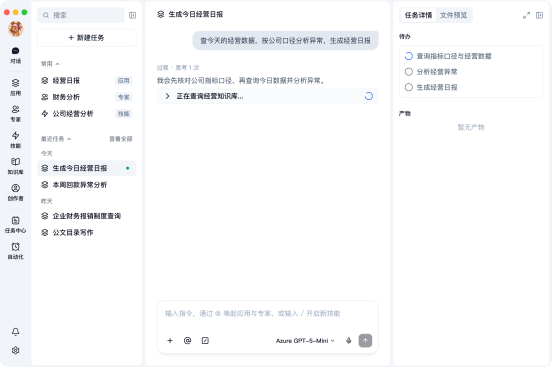
Finish in one workspace.

Describe the goal. Let the workspace plan the next step.

  • Use natural language, without a detailed prompt
  • Plan around the final deliverable
  • Use knowledge bases, databases, and business analysis skills within your access permissions.
Conversation

Give AI the expertise your business has built

Your enterprise expertise

Give AI the expertise your business has built.

  • Consistent metric definitions

    Metric definitions · Exception analysis

  • Proven analysis methods

    Knowledge bases · Business rules · Analysis skills

  • Clear delivery standards

    Company templates · Report requirements · Archiving rules

Enterprise expertise in Lingda Desktop

Put enterprise expertise in employees’ hands.

  • Understand your company knowledge

    Use local materials and authorized knowledge to interpret metrics correctly.

  • Apply your working methods

    Run published enterprise analysis skills according to your business rules.

  • Meet your delivery standards

    Apply enterprise templates, retain sources and revision history, and wait for approval.

Turn one person’s proven method into a capability for the team.

  1. 01

    An employee solves a problem

    Real work

    Useful steps, revisions, and insights emerge within the task.

  2. 02

    Capture the method that worked

    Submit for sharing

    Submit a personal method when it is ready for others to use.

  3. 03

    Review, manage, and publish

    Platform governance

    Your organization manages content, permissions, and versions, then decides how to make it available.

  4. 04

    Bring it into the next task

    Reuse

    The workspace matches enterprise capabilities to the task, so employees do not need to remember which one to call.

Finish today. Build on it tomorrow.

01 · Pick up where you left off

Return to a task whenever you need to

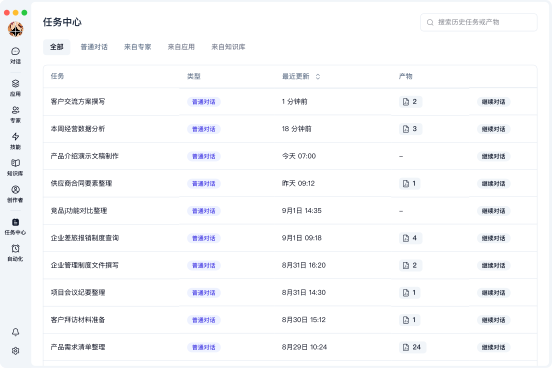
Conversations, execution history, and deliverables stay in the task. Return later or the next day and continue with the same context.

Find your previous work in the Task Center.

02 · Automate repetitive work

Set up the process once, then run it on a schedule

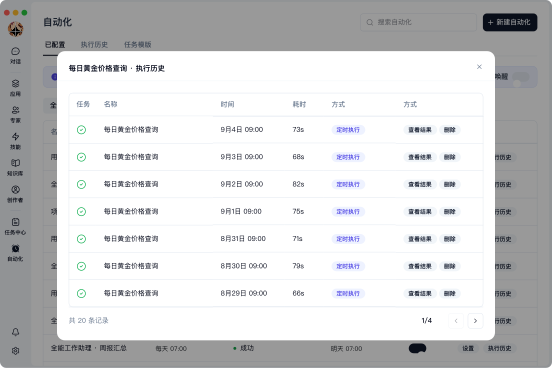
Use automations for recurring work such as daily price checks and routine reports. Each run keeps a record you can review when needed.

Define the recurring task once and let it run on schedule.

Let AI take action within clear limits

Work within your organization’s rules

When AI reads files, uses enterprise resources, or takes actions, security needs to be part of execution. Lingda applies enterprise permissions and rules throughout the task.

  • 01

    Sensitive content, identified first

    If a file contains sensitive information such as phone numbers or email addresses, the workspace can flag it, ask for confirmation, or block sending when necessary.

  • 02

    Enterprise resources, within permissions

    Content an employee is not authorized to see is also off limits to AI. Resources the organization has not approved will not be called freely.

  • 03

    Important actions, people confirm first

    For deletion, bulk edits, running a program, or sending content outward, the workspace can pause and wait for the employee to confirm before continuing.

  • 04

    Key processes, fully traceable

    The organization can see which resources were used, which key actions were taken, and whether any risk appeared along the way.

Help employees finish the work. Keep the methods that work.

For Employees

Start with your goal

  • Bring relevant knowledge, skills, and enterprise capabilities into the task automatically.
  • Pause, resume, and revise tasks as needed.
  • Use automations to keep recurring work running.

For Enterprises

Retain expertise and control how it is used

  • Turn proven methods into reusable enterprise capabilities.
  • Manage knowledge, tools, and permissions centrally.
  • Apply safeguards to sensitive data and important actions.